

Introduction
Welcome to the Wedge Connect API!
This API allows you to do things like fetch a list of jobs, create an invite for a candidate, and view your existing invites.

Environments
Use the following hostnames and base paths based on your environment:
| Hostname | Base Path | Port | TLS | ENV / Usage |
|---|---|---|---|---|
| api.wedgebeta.com | /connect/1.0 | 443 | true | Staging / Dev |
| api.wedgehr.com | /connect/1.0 | 443 | true | Production |
Generate Auth Token
Start by logging in at WedgeHR Hire App
Click Settings at the top and then Integrations on the left menu
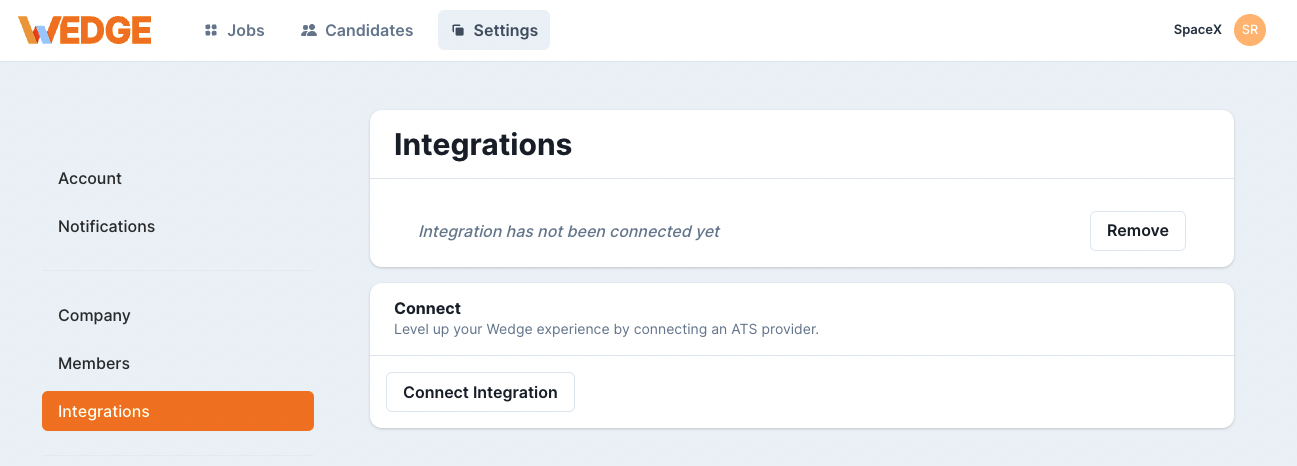
Now click Connect Integration
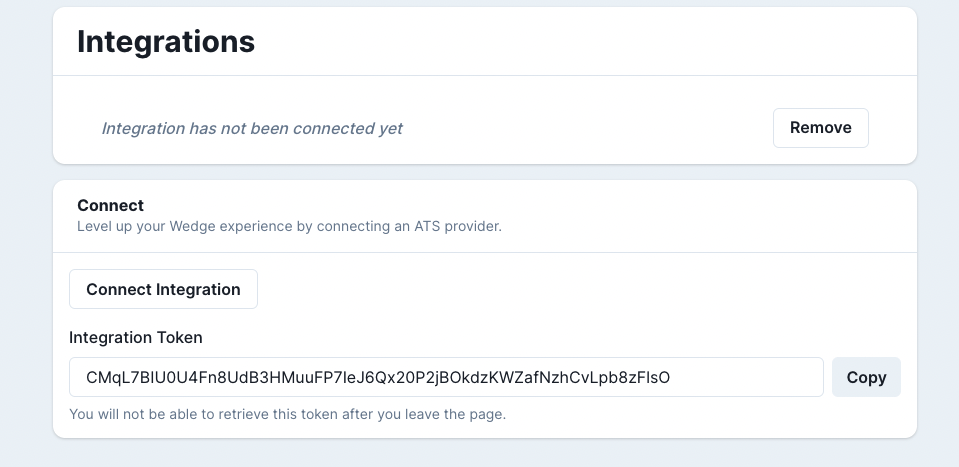
Copy your Integration Token and use it to interact with the Wedge Connect API
Authentication
Example request with authentation header:
# With shell, you can just pass the correct header with each request
curl "<api>"
  -H "Authorization: Bearer $TOKEN"
Make sure to replace
$TOKEN!.
Wedge uses an API key to allow access to the API. This API key is Org specific.
Wedge expects for the API key to be included in all API requests to the server in a header which looks like the following:
Authorization: Bearer $TOKEN
Invites
Properties of an Invite
A fetched invite contains these properties
| Property | Type | Description |
|---|---|---|
| id | int | unique identifier of this invite |
| jobId | int | ID of the job this invite belongs to |
| string | Email of the candidate this invite belongs to | |
| inviteSent | bool | Indicates if an invite has been sent to the Candidate |
| status | int | The status of the invite |
| statusText | string | Human readable version of the invite status |
| resultUrl | string | The public URL to the result |
| inviteUrl | string | the public URL to the invite |
| createdAt | string | Timestamp of when invite was created |
| completedAt | string | Timestamp of when invite was completed |
Invite Statuses
| Status | Description |
|---|---|
| 0 | not_completed |
| 1 | invited |
| 2 | complete |
| 3 | send_failure |
| 4 | canceled |
Create an Invite
| Parameter | Type | Description | Required |
|---|---|---|---|
| jobId | int | ID of the job this invitation belongs to | Yes |
| string | Email of the candidate | Yes | |
| firstName | string | The first name of the candidate | No |
| lastName | string | The last name of the candidate | No |
| shouldSendInvite | bool | Should an invitation be sent to the candidate | No |
| uniqueId | string | Add your own ID | No |
Possible Response Codes
| Code | Description |
|---|---|
| 201 | Successfully created invite |
| 422 | Validation error - one or more required fields are missing |
| 500 | Something unexpected happened ( Contact Us ) |
curl "<api>/invites"
  -H "Content-Type: application/json"
  -H "Authorization: Bearer ACCESS_TOKEN"
  -X POST
  --data '{"jobId": 2, "email": "fred@example.io", "firstName": "Fred", "lastName": "Smith", "shouldSentInvite": true, "uniqueId": "abc123"}'
The above command returns JSON structured like this:
{
  "data": {
    "id": 4017600317622981,
    "jobId": 7749825975819241,
    "email": "job_invite@wedge.test",
    "uniqueId": "32092387-2b2c-48f0-b864-2019c48fd4ce",
    "inviteUrl": "https://record.wedge.video/4017600317622981.CfWf85vQJNsqmbtMgRsjwX",
    "resultUrl": null,
    "inviteSent": true,
    "status": 1,
    "statusText": "invited",
    "createdAt": "2023-09-01T00:00:00Z",
    "completedAt": null,
  }
}
This endpoint creates a specific invite.
HTTP Request
POST <api>/invites
List Invites
curl "<api>/invites?filter[id]=1234"
  -H "Authorization: Bearer ACCESS_TOKEN"
The above command returns JSON structured like this:
{
  "data": [
    {
      "id": 7952721015002024,
      "jobId": 5911293050157308,
      "email": "job_invite@wedge.test",
      "uniqueId": "32092387-2b2c-48f0-b864-2019c48fd4ce",
      "inviteUrl": "https://record.wedge.video/7952721015002024.sew9R6MWqgrTAqukzJogxT",
      "resultUrl": null,
      "inviteSent": true,
      "status": 1,
      "statusText": "invited"
    }
  ],
  "meta": {
    "path": "https://api.wedgeops.com/connect/1.0/invites",
    "per_page": 30
  },
  "pagination": {
    "prev": null,
    "next": null
  }
}
This endpoint retrieves a specific invitation.
HTTP Request
Get by All
GET <api>/invites
Get by Job ID
GET <api>/invites?filter[jobId]=2482948239842
Get by Invite ID
GET <api>/invites?filter[id]=9588249528452
Get by Unique ID
GET <api>/invites?filter[uniqueId]=abc123
Get by Email
GET <api>/invites?filter[email]=test@wedge.test
Get by Status
GET <api>/invites?filter[status]=1
Possible Response Codes
| Code | Description |
|---|---|
| 200 | Success |
| 400 | Bad filter ID given |
| 403 | System could not fetch session data ( Contact Us ) |
| 404 | No invites found for given filter query |
| 500 | Something unexpected happen ( Contact Us ) |
Jobs
List Jobs
HTTP Request
Get all your Wedge jobs. The results are paginated with cursors.
GET <api>/jobs
GET <api>/jobs?page[cursor]=cursorKey&page[size]=10
Possible Response Codes
| Code | Description |
|---|---|
| 201 | Successfully fetched jobs |
| 500 | Something unexpected happened ( Contact Us ) |
curl "<api>/jobs?page[size]=2"
  -H "Authorization: Bearer ACCESS_TOKEN"
The above command returns JSON structured like this:
{
  "data": [
    {
      "_type": "job",
      "id": 1382244997593464,
      "companyId": 7182893298555114,
      "name": "Movers",
      "nameContextualized": "Movers",
      "archived": false,
      "slug": "movers-6327f2",
      "enabled": true,
      "slugEnabled": false,
      "slugRegistrationUrl": "https://wedge.video/j/movers-6327f2",
      "createdAt": 1655227170000,
      "updatedAt": 1655227170000
    },
    {
      "_type": "job",
      "id": 5972691925058329,
      "companyId": 7182893298555114,
      "name": "General Practitioner",
      "nameContextualized": "General Practitioner",
      "archived": false,
      "slug": "general-practitioner-3c865e",
      "enabled": true,
      "slugEnabled": false,
      "slugRegistrationUrl": "https://wedge.video/j/general-practitioner-3c865e",
      "createdAt": 1655227170000,
      "updatedAt": 1655227170000
    }
  ],
  "meta": {
    "path": "https://api.wedgeops.com/connect/1.0/jobs",
    "per_page": 2
  },
  "pagination": {
    "prev": null,
    "next": "eyJqb2IuaWQiOjU5NzI2OTE5MjUwNTgzMjksIl9wb2ludHNUb05leHRJdGVtcyI6dHJ1ZX0"
  }
}
Pagination
Pagination
Pagination can be used when fetching jobs and invites.
Append page[size]=30 to set the page size for the data returned.
At the bottom of the JSON returned on the right you will notice the pagination object.
"pagination": {
    "prev": null,
    "next": "eyJqb2IuaWQiOjU5NzI2OTE5MjUwNTgzMjksIl9wb2ludHNUb05leHRJdGVtcyI6dHJ1ZX0"
  }
This object contains cursors to go forward and backward in the page list.
If you would like to go forward a page append &page[cursor]= with the next cursor value.
When either cursor has the value of null then no other results exist in that direction.
curl "<api>/jobs?page[size]=2
      &page[cursor]=eyJqb2IuaWQiOjU5NzI2OTE5MjUwNTgzMjksIl9wb2ludHNUb05leHRJdGVtcyI6dHJ1ZX0"
  -H "Authorization: Bearer ACCESS_TOKEN"